Friday, May 16, 2008

Canon Users Check Out CHDK

CHDK is a software hack for Canon cameras that adds a great deal of functionality to low-end models. Because it is software that loads into memory and executes as opposed to a firmware modification, it does not pose any risk of bricking your camera. Simply restart your camera and functionality is restored to normal.

I have a Canon Powershot S2 IS, and there are a number of aspects of the camera that I have found very irritating. While this software can't fix the mediocre lens and sensor, it does allow you to get the absolute maximum performance they are capable of.

I enjoy night photography, but the combination of a maximum ISO rating of 400 and 15 second exposure maximum wasn't sufficient for many low light night situations. Also, the sensor is noisy and low contrast subjects show some noise even at ISO 50, and the camera firmware gives you no method of setting it lower.

While the software can't overcome physical limitations of the camera, it does overcome some nasty software limitations. I can now take exposures up to 64 seconds. During low light night photography the difference between 15 second and 64 second exposures is more dramatic than one might think. It really has made a difference in terms of the scope of things I can photograph at night.

Prior to this I recently discovered what I have come to learn is called "frame stacking", adding together the image data from multiple frames to simulate a longer exposure, there is nothing that prevents frame stacking from being applied to 64 second exposures further expanding the dark light capabilities of the camera.

When there is adequate light, I can now take advantage of lower ISO values to get less noisy images. Unfortunately, the image sensor in the S2 IS model does not seem to be capable of more than ISO 400, however, even ISO 400 is so noisy with this sensor that it's marginally usable.

CHDK also allows you to use the full mechanical range of the lenses F-stop settings. Unfortunately this only results in a very modest extension on the S2 IS because the lens is not capable of much more than F8.

CHDK adds the capability to capture raw images on Canon models. Older low-end Canon cameras and most newer Canon cameras do not have this capability built-in. This is useful if you are going to be doing post-processing since it preserves the full dynamic range of the captured image and there is no distortion or data loss resulting from jpeg encoding. You are then free to encode the image however you feel fit in external software.

The raw feature however does not give you the same quality as a good DSLR, the reason is that the sensors used on low end Canon cameras are only 10 bits/channel and tiny. 10 bits/channel limits dynamic range and the low size of the sensor limits light gathering capability and thus limits sensitivity and noise immunity. A DSLR will generally have a sensor that provides 12 bits/channel and generally has a larger sensor that can gather more light and provide a higher quality image with less lighting.


Another nice feature that is added is a realtime histogram. Before, I could only guess at night exposure, take the image, look at the image and the histogram, and then adjust and try again. Now, I can get the exposure close on the first exposure. This has resulted in a much larger percentage of my night shots being usable.

Another nice feature, CHKD offers the ability to monitor how much battery is left either in percentage or in terms of battery voltage. The existing battery monitor was almost useless when operating off of NiMH batteries as it gave only three values, full, half-full, and empty, and because NiMH is only 1.2 volts/cell the meter would only be "full" for the first few minutes of operation. It would then be half for the majority of operation and about three minutes before shutdown, it would be empty.

Now, I have a meter that reads 0-100%, and I can adjust the voltage thresholds for full and empty so I can have it reflect the NiMH batteries I use rather than Alkaline batteries. This gives me a much better idea of how much power I have left and helps avoid unexpected interruptions.

CHKD added some very nice video compression capability, the constant bit rate compression used by cannon was fixed at 1MB/S and video recorded at that compression ratio was good quality but with the 1GB limit it didn't even allow half-hours worth of video to be recorded in high quality. With the variable bit rate; I have found I can get reasonable quality and close to two hours of video on a 2GB card. The unit will still only allow one hour at a time to be recorded, even though it overcomes the 1GB file limit, an hour limit seems to be built into the units firmware. Fixed bit rate options ranging from .25MB/s to 3.0MB/s are available allowing even higher quality video than the original.

CHKD gives the user a great deal of control over what information is displayed, and there is a great deal of flexibility in how this information is displayed.

CHKD also has a built-in BASIC interpreter that allows users to write scripts to provide more complex functions and a multitude of such scripts exist, including motion detection. The motion detection is fast enough even for capturing lightning strikes. I have not had a chance to test scripts yet but will report back in the future when I do.

There is much more to CHDK, click on the title of this article to be taken to the CHDK Wiki which provides more information.

This photo is an example of one that would have been impossible without this software. It is taken only with moonlight and some light from a nearby homes porch light. Yes, there is some noise, but it would have been totally impossible without the additional two F-stops that the longer exposure time buys.

Haunted

Sunday, May 11, 2008

Overcoming Exposure Time Limitations - Night Photograph

Tonight the sky looking towards Vashon and Bainbridge has some very interesting color and cloud patterns, but it is quite dark. A 15 second exposure at ASA 50 would barely produce a few lights in the sky and increasing to ASA 400 results in intolerable noise. The Canon S2 IS supports a maximum exposure of 15 seconds.

I took nine 15 second exposures without moving the camera or changing the settings and then added them together with PaintShop XI. I loaded each image into a separate layer and used the "screen" blend mode.

Vasion Bainbridge Night from Alki

Here is my 2 minute 15 second exposure which captured the colorful sky very well. This was taken at 10:35 PM, about an hour and a half after sunset. The sky color is a mixture of moonlight, sodium vapor street light, mercury vapor street light, and other artificial lighting reflecting off of the clouds.

Sunday, September 16, 2007

Experiments

Corner

Corner

Empty

Empty

Sunday, August 5, 2007

Recent Photos

There are some random photos I've taken recently.

Kirkland Waterfront Park at Night

This is taken from a dock on Lake Washington at night. The lights in the park were sodium vapor. I used the custom white balance function on my camera to adjust to the color of the sodium vapor light.

The results are interesting in that neutral colors appear as if they were illuminated by white light but the colors appeared cold and washed out. Trees looked gray, the grass appeared green but a washed out green.

I used an effect in PaintShop Pro under film effects that is called "Warm Earth Tones". Doing so shifted the color of the sidewalk back to a slightly ruddy reddish color but not to the extreme of unadjusted sodium vapor lighting. Overall though the colors looked more natural than they did.

I have mixed feelings about outdoor lighting. Sometimes I think it would be nice if they switched to a good metal halide lamp for outdoor lighting, similar efficiency but much nicer color rendition, but then I remember I sold my telescope years ago when the light pollution became so bad that it was essentially rendered useless.

Kirkland waterfront park at night.

Big Bend Tree, River, Mountains

I took this photograph from behind a cabin on the Skykomish river in Big Bend. My oldest son is leasing the cabin from my mother in law and living there.

Behind cabin on the Skykomish river.

205th Eastward

I took this while stuck in traffic after leaving Aurora Village on 205th Street. I like the depth of the previous image and this one. Click on the image to see a big version which you really need to get the full effect.

205th Eastward

Thursday, July 26, 2007

Tripod Repair

I went down to Kirkland last night and took a few pictures to test my tripod repair. I didn't get camera shake on any of them so it looks as if my repair was successful.

For those who haven't been following this blog, I have a tripod that has a removable piece that attaches to the camera for quick release. The shoe that it sits in had a rubber mat to provide tension so that it was a tight fit but that fell out at some point leaving the piece attached in the camera free to move around in the shoe causing camera shake.

I used some of the fabric portion of stick-on Velcro as a substitute for the rubber mat and it seems to provide a nice snug fit that completely solved this problem. The only shake I experienced last night is that I took some photos from a dock and occasionally waves from the lake would hit the underside of the dock hard enough to move it.

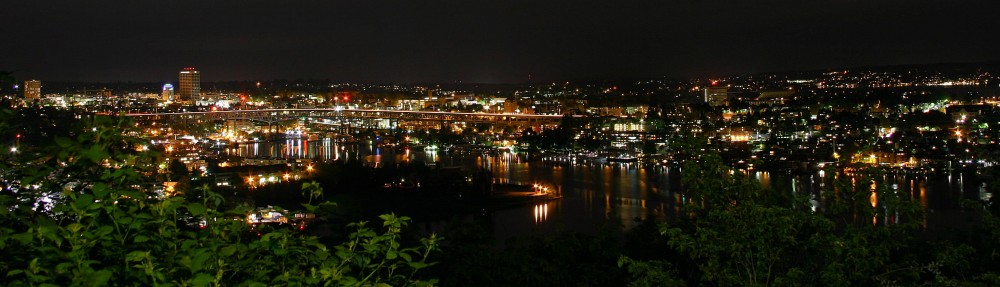
Seattle First Hill at Dusk photographed from Kirkland


First Hill photographed from Kirkland.

Downtown Seattle at Night


Downtown Seattle at Night.

Lake Washington Shoreline at Night


Lake Washington Shoreline at Night.

Click on any of these to see an enlarged version. The middle one especially but also the last benefit from this as there is a lot of detail not visible in the smaller image. The first image I think I did something accidentally bad like in Paintshop with the high pass filter and over emphasized the fine detail distorting the image.

When adjusting sharpness detail, if you have things not sharp enough, not enough high frequency content, a point will blur into a smudge. If conversely you have too much, then a bright point will get a dark ring around it. This can happen if you set the sharpness too high or if you accidentally run a high pass filter twice.

I've pretty much worked out a formula that compensates for this camera without overshoot which consists of running the high pass filter with a setting of two pixels and strength of 35, then a setting of one pixel with a strength of 70. This combination seems to compensate for the camera just about perfectly. I suspect I ran one an additional time on the first image.

Friday, July 20, 2007

Night Photography

I went down to Alki recently, primarily with the intent of taking some pictures of KNND's setup for my radio blog but I also wanted to take some night shots.

Unfortunately, what I didn't realize was that my tripod had lost a piece. It's got a quick release mount for the camera and the piece that attaches to the camera sits in the head of the tripod originally on a kind of rubberized mat.

Well, that mat was glued in apparently not well and fell out and went unnoticed except that when I went to use the tripod the camera wouldn't stay still on the head. I have since repaired it by using a piece of the fabric portion of stick on Velcro which provides the necessary tension to hold the little camera mount plate stable.

But some of my pictures that day got some camera shake in them as a result because I hadn't figure out what was wrong with the tripod yet.

Downtown Seattle at night.

Queen Anne hill in Seattle at night.

Space Needle and Science Center in Seattle at night.

Thursday, July 5, 2007

4th of July Fireworks

This year I had a fair degree of success at photographing fireworks. The settings I used were approximately F3.5, 3.2 second exposure, and 400 ASA film speed.

I started with a 50 ASA setting but that proved inadequately sensitive. 400 ASA was good for most, might have been a little too sensitive for some resulting in color wash-out, but overall was probably a good compromise.

Fireworks
Fireworks
Fireworks

I took many more. You can see them on my July 4th gallery page.

Monday, July 2, 2007

Macro

I've been playing with the macro capability on the Powershot S2 IS camera a bit lately. The following is a close-up photograph of a tiny flower being worked by a bee that, although I keep hearing has been dying off, seems to still be quite plentiful here in western Washington.

Flower and Bee

A limitation of the Powershot S2 IS shows up in this photograph. It is impossible to stop the lens down more than F8 and thus impossible to get a decent depth of field. A macro lens I have for my 35mm camera stops down to F22 which gives a depth of field just short of a pinhole camera.

Yes, I know I can't expect as much from a $300 digicam. Still I don't understand some of Canon's design decisions, particularly with respect to the lens on this camera.

Sunday, July 1, 2007

Most Popular Image

I've put over 700 images up on my gallery since I got the Cannon Powershot S2 IS. This one is one of the very first pictures I took, messing around at Golden Gardens just after I got the camera. It is also the most popular image on the gallery, viewed more than any other.

Girl In Water


Girl in Water

Saturday, June 30, 2007

Moire Pattern

There is a type of color distortion present in digital cameras that can under certain circumstances be mistaken for chromatic aberration but it manifests itself differently. It is what is known as a Moire pattern.

Moire pattern first presented itself in color television as a result of overlap of sideband information in the NTSC color broadcasting system. In that system, color information overlaps high frequency (fine detail) video information and so fine repeating details, such as a plaid shirt or pen striped suit, would result in a rainbow effect.

Digital cameras also are subject to Moire pattern but for a different reason. In digital cameras, the pixels each respond to a specific color, red, green, or blue. The geometric pattern that they are laid out in can result in banding when a high contrast line cuts the pattern.

In the following example, the fence top rail wasn't quite horizontal in the original photo and was made horizontal with the straighten tool. Because it was originally at an angle, it cut the pattern of pixels at a slight angle and acquired this rainbow banding as a result.

It should be noted that this is a small portion of a much larger picture and without being blown up and having the color exaggerated it probably would have gone unnoticed.

Moire pattern.

The strongly predictable nature of the Moire pattern from a digital camera makes it very amiable to software removal. The internal firmware of many cameras do this well enough that you may never notice this, but if you do, know that you can fix it using external software.

In this case, I used Paintshop Pro X's Adjustments->Add/Remove Noise->Moire Pattern removal. While I was at it, I also adjusted the brightness curve because the original looked kind of dark and dreary to me, that's a matter of personal taste or in my case, lack thereof. The important thing to notice is the banding is gone.

Moire pattern removed.
Google